external@serenity-js/html-reporter











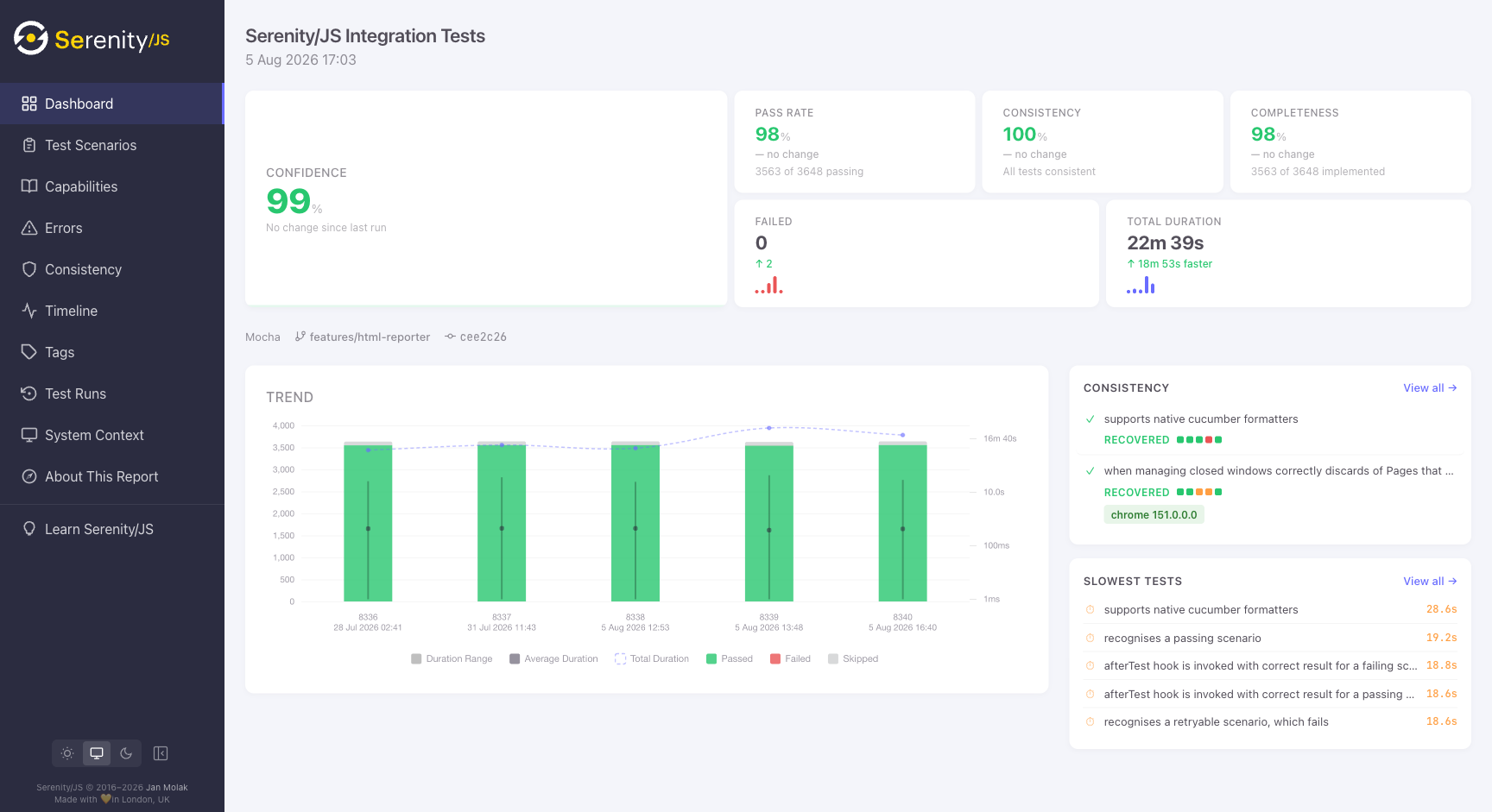
@serenity-js/html-reporter produces a self-contained, interactive HTML report from your Serenity/JS test results — complete with screenshots, activity trees, execution history, and trend analysis.
📊 See the Serenity/JS test suite report →
Features
- Single HTML file — all JavaScript, CSS, and chart logic inlined in
index.html; test data loaded from a companiondata.jsfile. Works fromfile://, GitHub Pages, S3, or any static host - No external dependencies at runtime — works in air-gapped environments, no CDN links, no network requests
- Execution history and trends — preserves data across runs, showing how tests behave over time
- Activity trees with evidence — every Task, Interaction, and assertion shown with timing, screenshots, and HTTP exchanges
- Consistency analysis — identifies flaky, degraded, and recovered tests automatically
- Error clustering — groups failures by root cause so you can see which tests share the same underlying problem
- Living documentation — renders README files alongside test results in the capabilities view
- Dark and light themes — detects OS preference, with manual toggle
Installation
npm install --save-dev @serenity-js/core @serenity-js/web @serenity-js/html-reporter
Note: @serenity-js/web is optional but recommended — it enables Photographer to capture screenshots that the HTML Reporter embeds in the report.
Quick Start
Add the reporter to your Serenity/JS crew configuration.
Playwright Test
// playwright.config.ts
import { defineConfig } from '@playwright/test';
import type { SerenityFixtures, SerenityWorkerFixtures } from '@serenity-js/playwright-test';

export default defineConfig<SerenityFixtures, SerenityWorkerFixtures>({
    reporter: [
        ['@serenity-js/playwright-test', {
            crew: [
                ['@serenity-js/html-reporter', {
                    outputDirectory: './reports/serenity-js',
                    title: 'My Project',
                }],
            ],
        }],
    ],
});
Learn more about using Serenity/JS with Playwright Test.
WebdriverIO
// wdio.conf.ts
export const config = {
    framework: '@serenity-js/webdriverio',
    serenity: {
        crew: [
            ['@serenity-js/html-reporter', {
                outputDirectory: './reports/serenity-js',
                title: 'My Project',
            }],
        ],
    },
};
Learn more about using Serenity/JS with WebdriverIO.
Cucumber, Mocha, or Jasmine
import { configure } from '@serenity-js/core';

configure({
    crew: [
        ['@serenity-js/html-reporter', {
            outputDirectory: './reports/serenity-js',
            title: 'My Project',
        }],
    ],
});
Learn more about using Serenity/JS with Cucumber, Mocha, or Jasmine.
View the report
After your tests complete, open the report directly or serve it locally:
npx @serenity-js/html-reporter serve --dir ./reports/serenity-js --open
By default the server binds to 0.0.0.0 (all interfaces). Use --host 127.0.0.1 to restrict access to localhost, or --host :: for IPv6.
Configuration Options
All options are optional. See the HtmlReporterConfig API reference for full details.
| Option | Type | Default | Description |
|---|---|---|---|
outputDirectory | string | ./reports/serenity-js | Where the report is generated |
title | string | — | Report title shown in the header. Falls back to projectName, then test runner name. |
specDirectory | string | auto-detected | Root of your specs, used to build the requirements hierarchy |
maxHistory | number | — | Maximum test runs to retain (older runs are pruned) |
consistencyWindow | number | 5 | Number of recent runs used to detect flaky tests |
projectName | string | auto-detected | Project name (from closest package.json). Used as title fallback and shown in System Context view. |
testRunId | string | auto-detected | Test run directory identifier (defaults to CI build number or ISO timestamp) |
moduleId | string | auto-detected | Module identifier for parallel CI job shards (defaults to working directory name when a CI build number is detected) |
ci | object | auto-detected | Override CI/CD context (see fields below) |
Note:
consistencyWindowis effectively capped atmaxHistory. If you setconsistencyWindow: 10butmaxHistory: 5, the reporter uses the 5 available runs for detecting consistency issues.
Overriding CI context
The reporter auto-detects CI metadata from environment variables (GitHub Actions, GitLab CI, Jenkins, CircleCI). Use the ci option when running outside CI or when auto-detection doesn't match your setup:
['@serenity-js/html-reporter', {
    outputDirectory: './reports/serenity-js',
    ci: {
        provider: 'Jenkins',
        buildNumber: process.env.BUILD_NUMBER,
        branch: process.env.GIT_BRANCH,
        commit: process.env.GIT_COMMIT,
        commitMessage: process.env.GIT_COMMIT_MESSAGE,
        commitAuthor: process.env.GIT_AUTHOR_NAME,
        jobUrl: process.env.BUILD_URL,
        repositoryUrl: process.env.GIT_URL,
    },
}]
All ci fields are optional:
| Field | Description |
|---|---|
provider | CI provider name (e.g., 'GitHub Actions', 'Jenkins') |
buildNumber | Build or pipeline number |
branch | Git branch name |
commit | Git commit SHA |
commitMessage | Commit message |
commitAuthor | Commit author name |
jobUrl | URL linking to the CI job |
repositoryUrl | URL of the source repository |
CLI
The package includes a CLI for aggregating results from multiple parallel jobs and serving reports locally. Run --help to see all available commands and options:
npx @serenity-js/html-reporter --help
Aggregating results from parallel CI jobs
npx @serenity-js/html-reporter aggregate \
  --input "modules/*/reports/serenity-js/test-runs/**" \
  --output ./reports/serenity-js \
  --title "My Project"
See the CI integration guide for complete single-job and multi-job workflow examples.
Serving the report locally
npx @serenity-js/html-reporter serve --dir ./reports/serenity-js --open
How --input resolves patterns
The --input option accepts one or more glob patterns (comma-separated). The CLI automatically locates db.json files within the matched directories:
- If your pattern already ends with
db.jsonordb-*, it's used as-is - Otherwise, the CLI appends
/**/db.jsonand/**/db-*.jsonto find all test run data
This means --input "reports/*/test-runs/*" and --input "reports/*/test-runs/**/db.json" produce the same result. The shorter form is recommended for readability.
Multiple input sources can be combined with commas:
npx @serenity-js/html-reporter aggregate \
  --input "ci-artifacts/*/test-runs/*,local-runs/test-runs/*" \
  --output ./reports/serenity-js
CI Integration
The reporter preserves execution history across runs when you persist its output directory between builds. This enables trend analysis and consistency scoring.
The pattern works with any CI provider:
- Restore the previous report output before running tests
- Run your test suite (the reporter writes to the output directory)
- Deploy the output to static hosting (GitHub Pages, GitLab Pages, S3, etc.)
For provider-specific setup instructions, see:
Report Output Structure
After a test run, the output directory contains:
reports/serenity-js/
├── index.html          ← Self-contained report viewer (JS + CSS inlined)
├── data.js             ← Aggregated test data loaded by index.html
├── screenshots/        ← Captured screenshots (referenced by data.js)
└── test-runs/
    └── <run-id>/       ← One directory per test run
        └── <module>/
            └── db.json ← Raw test data for that module/run
The test-runs/ directory is what enables execution history and trend analysis. Each run is stored independently so the reporter can aggregate them into the final data.js. Persist this entire directory between CI builds to retain history.
The index.html file works standalone — open it directly from file:// or serve it from any static host. It reads data.js via a relative <script> tag; no network requests are made at runtime.
Migrating from @serenity-js/serenity-bdd
If you're currently using @serenity-js/serenity-bdd for HTML reporting, you can switch to @serenity-js/html-reporter for a simpler setup — no Java, no JAR downloads, and built-in trend analysis. Both reporters can run side by side during migration.
See Running both reporters together for a step-by-step migration guide.
Documentation
- HTML Reporter Handbook — requirements hierarchy, CI integration patterns, migration from Serenity BDD
- API Reference
- Reporting Guide
- Serenity/JS Project Templates
- Tutorial: First Web Scenario
Contributing
Contributions of all kinds are welcome! Get started with the Contributing Guide.
Community
- Community Chat
- Discussions Forum
- Visit the 💡How to... ? section for answers to common questions
If you enjoy using Serenity/JS, make sure to star ⭐️ Serenity/JS on GitHub to help others discover the framework!
License
The Serenity/JS code base is licensed under the Apache-2.0 license, while its documentation and the Serenity/JS Handbook are licensed under the Creative Commons BY-NC-SA 4.0 International.
See the Serenity/JS License.
Support
Support ongoing development through GitHub Sponsors. Sponsors gain access to Serenity/JS Playbooks and priority help in the Discussions Forum.
For corporate sponsorship or commercial support, please contact Jan Molak.

