external@serenity-js/webdriverio











Serenity/JS revolutionises automated testing by enabling your team to write expressive, maintainable tests that align with your unique domain. Seamlessly integrating with WebdriverIO and test runners like Mocha, Cucumber, and Jasmine, Serenity/JS also offers advanced reporting that provides clear insights into test results, helping both technical teams and business stakeholders understand the quality of the system under test.
Features
- Write expressive, maintainable tests that align with your unique domain using the Serenity/JS Screenplay Pattern APIs.
- Leverage advanced reporting to track progress, detect failures, and share results with both technical and business stakeholders.
- Build on flexible, modular, and extensible architecture that supports a wide range of test automation needs.
- Integrate with WebdriverIO and modern test automation tools.
Quick Start
Serenity/JS integrates with the WebdriverIO command line wizard to help you set up a new project with the required dependencies, configuration and example tests.
If you prefer to review a reference implementation first or use it as a starting point for your project, you can clone a Serenity/JS Project Template for your preferred test runner.
Creating a project
To use the WebdriverIO wizard to create a new project, run the following command in your computer terminal:
npm init wdio ./my-project
To create a Serenity/JS project, select the following options:
- Type of testing: E2E Testing
- Automation backend: any - Serenity/JS supports both local and remote WebdriverIO test runners; select local to keep it simple
- Environment: web
- Browser: any - Serenity/JS supports all browsers supported by WebdriverIO; selecting Chrome is a good starting point
- Framework: Jasmine with Serenity/JS, Mocha with Serenity/JS, or Cucumber with Serenity/JS; we'll use Mocha with Serenity/JS in this example
- Compiler: any - Serenity/JS supports both TypeScript and JavaScript; we recommend TypeScript for better tooling support
- Generate test files: yes, if you'd like Serenity/JS to give you a starting point for your test scenarios
- Test file location: accept the defaults unless you'd like to store your code in a different directory
- Test reporter: any, Serenity/JS configures the project to use Serenity/JS reporting services, and you can add native WebdriverIO reporters too if needed
- Plugins/add-ons/services: none; Serenity/JS doesn't require any additional plugins to work with WebdriverIO
To create a Serenity/JS, WebdriverIO and Cucumber project, follow the tutorial:
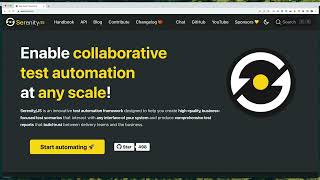
Writing a test scenario
Assuming you've chosen Mocha with Serenity/JS and requested the wizard to generate example test files for you,
you'll find your first test file located at ./test/specs/example.spec.ts:
// ./test/specs/example.spec.ts
import { describe, it } from 'mocha'

import { Ensure, equals } from '@serenity-js/assertions'
import { actorCalled } from '@serenity-js/core'
import { By, Navigate, PageElement, Text } from '@serenity-js/web'

describe('Example', () => {

    it('interacts with a web page', async () => {

        await actorCalled('Alice').attemptsTo(
            Navigate.to('https://serenity-js.org'),
            Ensure.that(
                Text.of(PageElement.located(By.id('cta-start-automating'))),
                equals('Start automating 🚀')
            ),
        )
    })

    // ... other examples
})
You'll notice that the example test file uses:
@serenity-js/assertions- to make assertions about the state of the system under test@serenity-js/core- to create and manage actors@serenity-js/web- to interact with web pages
You can learn more about these and other Serenity/JS modules in the Serenity/JS API documentation.
The configuration of your project is located in the wdio.conf.ts file. Check out the Serenity/JS WebdriverIO integration guide for more details.
Running your tests and generating reports
To run your tests and generate Serenity/JS reports, execute the following command in your terminal:
npm run serenity
Your test results will be available in the target/site/serenity directory.
To view them, open the index.html file in your preferred web browser.
Documentation
- API Reference
- Screenplay Pattern Guide
- Serenity/JS Project Templates
- More examples and reference implementations
- Tutorial: First Web Scenario
- Tutorial: First API Scenario
Contributing
Contributions of all kinds are welcome! Get started with the Contributing Guide.
Community
- Community Chat
- Discussions Forum
- Visit the 💡How to... ? section for answers to common questions
If you enjoy using Serenity/JS, make sure to star ⭐️ Serenity/JS on GitHub to help others discover the framework!
License
The Serenity/JS code base is licensed under the Apache-2.0 license, while its documentation and the Serenity/JS Handbook are licensed under the Creative Commons BY-NC-SA 4.0 International.
See the Serenity/JS License.
Support
Support ongoing development through GitHub Sponsors. Sponsors gain access to Serenity/JS Playbooks and priority help in the Discussions Forum.
For corporate sponsorship or commercial support, please contact Jan Molak.

Index
Configuration
externalWebdriverIOConfig
Variables
externaldefault
WebdriverIO Framework Adapter integrates WebdriverIO with Serenity/JS
Type declaration
init: function
Parameters
externalcid: string
externalconfig: WebdriverIOConfig
externalspecs: string[]
externalcapabilities: RequestedStandaloneCapabilities | RequestedStandaloneCapabilities[] | RequestedMultiremoteCapabilities | RequestedMultiremoteCapabilities[]
externalreporter: EventEmitter<DefaultEventMap> & ProvidesWriteStream & InitialisesReporters
Returns Promise<{ hasTests: () => boolean; run: () => Promise<number> }>

WebdriverIO configuration object, with Serenity/JS-specific additions.
Integrating WebdriverIO with Serenity/JS
Learn more
CucumberConfigJasmineConfigMochaConfig